You have successfully downloaded GCash, registered your mobile number, and created an MPIN. However, when you open the app, you notice that your profile is marked Basic.
You may also find that some features are missing or unavailable. Perhaps you can buy load and pay bills, but you cannot send money to another person. Maybe someone transferred money to you, but you cannot move it to your bank account.
This is where the difference between a Basic and a Fully Verified GCash account becomes important.
A Basic account gives you access to a small set of essential services. A Fully Verified account unlocks GCash’s major money-transfer, online-payment, savings, investment, insurance, card, and other financial features. It also provides significantly higher wallet and transaction limits.
In this guide, we will compare the two account types, explain what you can and cannot do with each one, and show you how to upgrade your account.
Content
Basic vs. Fully Verified GCash: Quick Comparison
Here is a simple overview of the difference:
| GCash feature | Basic account | Fully Verified account |
|---|---|---|
| Cash In | Yes | Yes |
| Pay Bills | Yes | Yes |
| Buy Load | Yes | Yes |
| Scan to Pay | Yes | Yes |
| Receive money from a Fully Verified user | Yes | Yes |
| Send money through Express Send | No | Yes |
| Transfer money to banks and e-wallets | No | Yes |
| Pay online | No | Yes |
| Order and use a GCash Card | No | Yes |
| Access GSave | No | Yes |
| Access GInvest or GFunds | No | Yes |
| Access GInsure | No | Yes |
| Access GLife | No | Yes |
| Access eligible borrowing services | No | Yes, subject to eligibility |
| Access selected commute services | No | Yes |
| Standard wallet limit | ₱10,000 | ₱100,000 |
| Standard monthly incoming limit | ₱5,000 | ₱100,000 |
| Standard outgoing limit | ₱5,000 monthly | ₱100,000 daily |
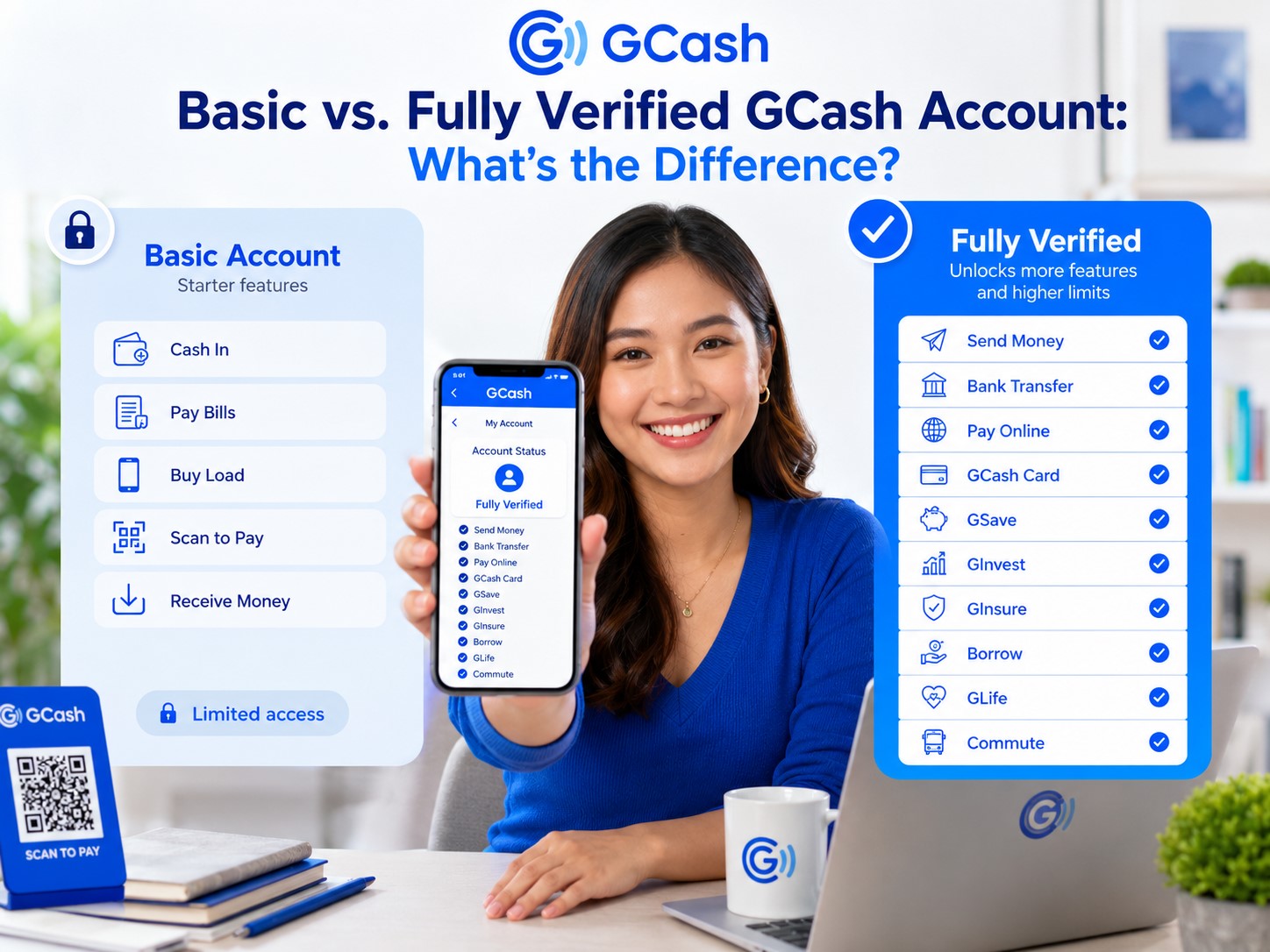
Every newly registered GCash account begins as a Basic profile. Full verification unlocks the Basic features plus Send Money, Bank Transfer, Pay Online, GCash Card, Borrow, GSave, GInvest, GInsure, GLife, and Commute.
What Is a Basic GCash Account?
A Basic GCash account is the initial profile you receive after registering a new mobile number.
At this point, you have created an account, but GCash has not yet completed the full identity-verification process. You may have entered your name, birthday, address, and other personal details during registration, but you have not yet submitted an accepted government-issued ID and completed the required selfie scan.
A Basic account can use the following main services:
- Cash In
- Pay Bills
- Buy Load
- Scan to Pay
- Receive money from a Fully Verified GCash user
However, it cannot use services such as Express Send, Bank Transfer, Pay Online, or the GCash Card.
A Basic account is useful for testing the app or completing a few simple transactions. However, it is too limited for someone who wants to use GCash as a regular mobile wallet.
What Is a Fully Verified GCash Account?
A Fully Verified account is a GCash profile whose owner has completed the identity-verification process.
To become Fully Verified, a regular adult user generally needs to:
- Open GCash and tap Profile.
- Select Verify Now.
- Enter the six-digit code sent to the registered number.
- Provide the required personal details.
- Scan one accepted government-issued ID.
- Complete a selfie scan.
- Review the information.
- Submit the application.
GCash says users generally receive an update through SMS within three days after submitting the application.
Once approved, the profile gains access to GCash’s broader range of features and receives higher wallet and transaction limits.
What Can You Do With a Basic GCash Account?
A Basic account can still handle several common transactions.
Cash In
You may add money to your Basic GCash wallet through supported cash-in methods.
However, your Basic profile has a much smaller wallet and incoming limit. Even when a cash-in channel allows a larger transaction, your account cannot receive an amount that would cause it to exceed its applicable limits.
Pay Bills
Basic users can pay participating billers using money already available in their wallets.
This can include selected electricity, water, telecommunications, internet, government, credit-card, insurance, and other billers available in the app. The exact billers, processing times, and convenience fees depend on the service selected.
Buy Load
You may use a Basic account to purchase supported mobile and other prepaid load products.
Before confirming, check the recipient’s mobile number, the selected promo, the validity period, and any applicable convenience fee.
Scan to Pay
A Basic account can scan participating merchant QR codes and pay using the wallet balance.
Always check the merchant name and amount before confirming. Scanning a QR code does not automatically guarantee that the displayed recipient is the business or person you intended to pay.
Receive Money
A Fully Verified GCash user can send money to a Basic or non-verified account. The sender will see a notice indicating that the recipient is non-verified.
The Basic user can receive the money, but cannot use Express Send to send it to another GCash user.
What Can’t You Do With a Basic GCash Account?
This is where many first-time users become confused.
You may have successfully added or received money, but the app will not allow you to move it in the way you expected.
You Cannot Send Money Through Express Send
Basic users cannot use Express Send to transfer money to another GCash account.
For example, suppose your friend sends ₱1,000 to your Basic account. You may receive the funds, but you cannot simply use Express Send to forward that ₱1,000 to another person.
This is one of the strongest reasons to verify your account before receiving money for an important transaction.
You Cannot Transfer Money to a Bank or E-Wallet
Bank Transfer is reserved for Fully Verified users.
A Basic user cannot transfer the wallet balance directly to participating banks or other e-wallets through the normal local-transfer feature.
Do not add a large amount to a Basic account while assuming that you can immediately transfer it to your bank.
You Cannot Pay Online Using the Regular GCash Checkout Feature
GCash’s Pay Online feature requires a Fully Verified account.
This feature is commonly used on supported shopping websites, apps, subscription services, and online merchant checkouts.
A Basic account’s ability to scan a merchant QR code does not mean it can automatically use every online GCash payment option.
You Cannot Order or Use a GCash Card
The GCash Card is included among the services unlocked through full verification.
Because the card is connected to your GCash wallet and can be used for purchases or compatible ATM withdrawals, GCash requires the account owner to complete identity verification first.
You Cannot Access GSave
GSave provides access to savings accounts offered by GCash’s partner banks.
A Basic account cannot open or use the regular GSave feature. You must become Fully Verified first.
You Cannot Access GInvest
Investment services require a Fully Verified account.
Becoming verified only unlocks access to the feature. It does not remove the need to complete any risk assessment, suitability questionnaire, product application, or separate eligibility requirement associated with a specific investment.
You Cannot Access GInsure
GInsure is also listed as a Fully Verified feature.
Insurance availability, coverage, premiums, exclusions, and claims procedures depend on the specific product and insurance provider.
You Cannot Access Regular Borrowing Features
The Borrow section—including products such as GLoan, GCredit, and GGives—is intended for Fully Verified accounts.
However, becoming Fully Verified does not guarantee that you will receive a loan, credit line, or installment offer. For example, GLoan is available only to selected, pre-qualified users, and GCash regularly evaluates eligibility based on separate requirements and account factors.
Think of full verification as one requirement—not an automatic approval.
Basic vs. Fully Verified GCash Wallet Limits
The difference in limits is significant.
| Type of limit | Basic | Fully Verified |
|---|---|---|
| Maximum wallet balance | ₱10,000 | ₱100,000 |
| Monthly incoming limit | ₱5,000 | ₱100,000 |
| Daily outgoing limit | No separate daily limit listed | ₱100,000 |
| Monthly outgoing limit | ₱5,000 | No separate monthly limit listed |
GCash defines the wallet limit as the maximum amount that can be kept in the wallet at any given time. The incoming limit covers money received during the month, while the outgoing limit covers money spent or sent from the wallet.
The word “None” in GCash’s limit table does not necessarily mean that every transaction is unlimited. It means no separate general limit is listed for that particular daily or monthly category. Individual GCash services—including the GCash Card, GSave, and GCrypto—may still have their own transaction limits.
Understanding the Basic Wallet Limit
A Basic account can hold up to ₱10,000 at one time.
However, that does not mean you can necessarily receive ₱10,000 every month. The monthly incoming limit for a Basic account is only ₱5,000.
For example:
- Your wallet balance starts at ₱0.
- You receive ₱3,000.
- You spend the entire ₱3,000.
- You later receive another ₱2,000.
You have now received a total of ₱5,000 for the month, even though your current balance is only ₱2,000. Another incoming transaction may fail because you have already reached the monthly incoming limit.
Limits measure the flow of money, not only the amount currently sitting in the wallet.
Understanding the Fully Verified Wallet Limit
A regular Fully Verified account can hold up to ₱100,000 at one time and receive up to ₱100,000 per month under the standard profile limits.
It also has a general outgoing limit of ₱100,000 per day. GCash’s published table does not list a separate monthly outgoing cap for the regular Fully Verified profile, although service-specific and transaction-count limits may still apply.
These higher limits make a Fully Verified account much more practical for regular transfers, household bills, online purchases, and other daily financial transactions.
When Do GCash Limits Reset?
GCash says that when you reach an applicable monthly limit, certain services may remain unavailable until the limit resets on the first day of the next month or until you successfully upgrade your profile.
Deleting the app, changing phones, or creating repeated transaction attempts will not reset the limit.
You can review your personal limits through:
Profile → Profile Limits
Your actual profile status and available limits inside the app should be treated as the most relevant information for your account.
Can a Basic User Receive Money?
Yes.
A Fully Verified user can send money to a Basic account. GCash will display a note to the sender indicating that the recipient is non-verified.
However, this creates an important limitation:
The Basic user can receive the money but cannot send it through Express Send.
Before sending money to a Basic account, consider how the recipient plans to use the funds. They may be able to spend the balance on bills, load, or merchant QR payments, but they cannot access the normal Send Money or Bank Transfer features.
Can a Basic User Send Money?
No. A Basic or non-verified user cannot use Express Send.
Only a Fully Verified account can send money to another GCash user through the standard GCash-to-GCash transfer process.
This restriction remains even when the Basic wallet already contains enough money for the intended transfer.
Can a Basic User Pay Bills?
Yes.
Pay Bills is one of the official Basic account features.
However, the payment must still fit within the account’s wallet and outgoing limits. The Basic profile’s general outgoing limit is ₱5,000 per month.
The biller may also impose its own minimum amount, maximum amount, posting period, and convenience fee.
Can a Basic User Buy Load?
Yes.
Buy Load is available to both Basic and Fully Verified users.
Check the recipient’s number carefully because a successful load purchase sent to the wrong number may be difficult or impossible to recover.
Can a Basic User Pay Through QR?
Yes.
Scan to Pay is included in the Basic profile.
Before confirming a QR payment, verify:
- The merchant or recipient name
- The payment amount
- The available wallet balance
- Any displayed fee
- Whether the QR code appears to have been covered by another sticker
Can a Basic User Transfer Money to a Bank?
No.
Bank Transfer is unlocked only after the account becomes Fully Verified.
If you expect to receive money that you will later transfer to BPI, BDO, UnionBank, LandBank, Maya, or another participating institution, complete verification before accepting the funds.
Does Full Verification Cost Money?
GCash does not list a standard fee for submitting a full-verification application through the official app.
You generally need one accepted government-issued ID and a successful selfie scan.
Do not pay an unofficial agent who promises to verify your account, bypass an ID requirement, or speed up approval.
How to Upgrade From Basic to Fully Verified
The verification process is completed inside the official GCash app.
Step 1: Open GCash
Log in using your registered mobile number and MPIN.
Step 2: Go to Profile
Tap Profile from the homepage.
Step 3: Tap “Verify Now”
Select the verification option displayed below or near your profile status.
Step 4: Enter the Authentication Code
GCash will send a six-digit code to your registered number.
Enter it inside the app. Never share this code with another person.
Step 5: Enter Your Information
Provide your birthday, citizenship, and other requested details.
The information should match your identification document.
Step 6: Scan an Accepted ID
Select the ID you intend to use and take a clear image.
GCash says only one valid government ID is generally required for regular verification.
Step 7: Complete the Selfie Scan
Position your face inside the guide and follow the requested movements.
Use good lighting, remove anything covering your face, and make sure no other person appears behind you.
Step 8: Review and Submit
Check your name, birthday, ID details, and other information before tapping Submit.
GCash says you should receive an SMS update within three days.
What IDs Can Filipino Adults Use?
For Filipino adults aged 18 and above with a Philippine SIM, GCash’s accepted list currently includes:
- National ID in supported card, paper, or digital form
- Philippine passport
- Pag-IBIG Loyalty Plus Card
- Driver’s license
- Philippine Postal ID
- PRC ID
- UMID
- SSS ID
The ID must be valid, unexpired, clear, and undamaged. GCash generally requires the original physical document, except for supported National ID formats.
What Happens After You Become Fully Verified?
Once your application is approved, your profile status should change to Fully Verified.
You should then gain access to features such as:
- Send Money
- Bank Transfer
- Pay Online
- GCash Card
- GSave
- GInvest
- GInsure
- GLife
- Borrow, when separately eligible
- Commute services
Your standard wallet limit should also increase from ₱10,000 to ₱100,000, while the standard monthly incoming limit increases from ₱5,000 to ₱100,000.
If the app still shows Basic after approval, close and reopen it, check your profile status, and make sure you received a successful-verification SMS rather than only a submission confirmation.
Does Becoming Fully Verified Automatically Give You a ₱500,000 Limit?
No.
A regular Fully Verified account has a standard wallet limit of ₱100,000. The ₱500,000 limit belongs to a separate profile category known as GCash Plus.
To qualify for a possible increase to ₱500,000, GCash currently requires the user to:
- Be at least 18 years old
- Have a Fully Verified account
- Have an active account
- Complete one of the qualifying transactions
Qualifying options include linking and cashing in through selected providers, maintaining at least ₱100 in a qualifying GSave account for five business days, or investing at least ₱100 in a qualifying GFunds product for five business days. GCash says the limit review may take five business days.
Verification is therefore the first upgrade—not necessarily the final possible limit level.
Does Fully Verified Mean Every GCash Feature Is Automatically Approved?
No.
Full verification gives you access to the relevant sections and makes you eligible to use or apply for more services. It does not guarantee that every financial product will be approved.
For example, GLoan is a pre-qualified loan available only to selected users. Being Fully Verified is a basic requirement, but GCash also considers age, citizenship, account activity, payment history, and other eligibility criteria.
The same general principle applies to credit, installment, investment, insurance, and partner-bank services: additional requirements and terms may apply.
Can You Stay on a Basic Account Permanently?
You should not assume that a Basic account can remain open indefinitely without consequences.
GCash states that users are required to verify their accounts within 12 months of account creation. If an account remains unverified:
- Access is limited to basic services.
- An account with a zero balance may be closed.
- An account with a remaining balance may be suspended.
- A ₱30 monthly maintenance fee may apply after suspension until the balance reaches zero or the maximum stated period is reached.
GCash says the account may eventually be deactivated and permanently closed.
For this reason, full verification is more than a way to gain extra features. It may also be necessary to keep the account usable over the long term.
What if a Fully Verified Account Is Downgraded to Basic?
GCash may require Fully Verified users to update their account information periodically.
GCash sends reminders through SMS and the app inbox before the deadline. If the user fails to update the required information, the profile may be downgraded from Fully Verified to Basic.
To update your account information:
- Open GCash.
- Tap Profile.
- Tap your name.
- Select Update Account Information.
- Tap Get Started.
- Follow the instructions.
If you miss the deadline and the account is downgraded, GCash says you will need to restart the verification process. Your funds remain safe, but access to Fully Verified features becomes restricted.
How Many Fully Verified GCash Accounts Can You Have?
GCash currently allows one person to have up to five Fully Verified personal accounts under the same name.
These accounts are automatically linked to one customer profile. Their wallet and transaction limits are not combined to create a larger total.
For example, if one linked account qualifies for a ₱500,000 profile limit, GCash says the highest applicable limit may apply across the linked accounts—but the limits are not added together.
Creating five accounts does not give you five separate ₱500,000 limits.
Which Account Type Is Better?
For almost every regular user, a Fully Verified account is the more practical choice.
A Basic account may be enough when you only want to:
- Test the app
- Buy a small amount of load
- Pay a limited bill
- Make a small merchant QR payment
- Receive a limited amount of money for direct spending
A Fully Verified account is better when you want to:
- Send money to relatives or friends
- Transfer funds to a bank
- Use GCash for online shopping
- Order a GCash Card
- Receive and manage larger amounts
- Open a GSave account
- Explore investments or insurance
- Become eligible for selected borrowing products
- Use GCash regularly for personal finances
The difference is not only about having more features. It is also about having enough flexibility to move and manage the money in your wallet.
Tips Before Adding Money to a Basic Account
If your account is still Basic, follow these precautions.
Check Your Profile Limits
Go to Profile → Profile Limits before receiving or cashing in money.
Do Not Accept More Than You Can Use
Remember that you cannot use Express Send or Bank Transfer while the profile remains Basic.
Verify Before an Important Transaction
Do not wait until the day you need to send tuition, rent, emergency funds, or another time-sensitive payment.
GCash says verification updates are generally sent within three days, so the upgrade may not happen instantly.
Keep Your ID Ready
Use an accepted, valid, unexpired, and undamaged identification document.
Enter Matching Information
Your name and birthday should match your ID exactly.
Do Not Use an Unofficial Verification Agent
Verification must be completed through the official GCash app.
Never provide another person with your ID, MPIN, OTP, or selfie in exchange for supposed account assistance.
Frequently Asked Questions
Is a Basic GCash account verified?
No. A Basic profile is a newly registered or non-verified account.
Is a Fully Verified GCash account the same as GCash Plus?
No. A regular Fully Verified account has a standard wallet limit of ₱100,000. GCash Plus is a higher profile with a ₱500,000 wallet and monthly incoming limit for qualifying Fully Verified users.
Can a Basic GCash account receive money?
Yes. A Fully Verified user can send money to a Basic account, subject to the Basic user’s wallet and incoming limits.
Can a Basic account send money?
No. Basic users cannot use Express Send.
Can a Basic account transfer money to a bank?
No. Bank Transfer is a Fully Verified feature.
Can a Basic account pay bills?
Yes. Pay Bills is available to both Basic and Fully Verified accounts.
Can a Basic account buy load?
Yes. Buy Load is available to both account types.
Can a Basic account scan a QR code to pay?
Yes. Scan to Pay is available to Basic users.
Can a Basic account pay for online shopping?
The regular GCash Pay Online feature requires a Fully Verified account.
Can a Basic account order a GCash Card?
No. The GCash Card is listed as a Fully Verified feature.
What is the maximum balance of a Basic GCash account?
The published maximum wallet balance for a Basic profile is ₱10,000. Its monthly incoming limit is ₱5,000.
What is the maximum balance of a Fully Verified account?
A regular Fully Verified profile has a maximum wallet balance of ₱100,000. Eligible users may later qualify for GCash Plus, which has a ₱500,000 wallet limit.
How long does full verification take?
GCash says applications are processed and SMS updates are sent within three days.
Do I need two IDs to become Fully Verified?
GCash says a regular verification application generally requires only one valid government-issued ID, along with a selfie scan.
Does full verification guarantee GLoan?
No. Fully Verified status is a requirement, but GLoan is offered only to selected, pre-qualified users and is not guaranteed.
Can my Fully Verified account become Basic again?
Yes. GCash may downgrade an account if the user fails to update required account information before the deadline.
Will I lose my money if my account is downgraded?
GCash says funds remain safe after a downgrade, but access to Fully Verified features becomes restricted.
How many Fully Verified accounts can I own?
GCash currently allows up to five Fully Verified personal accounts under one person’s name.
Final Thoughts
A Basic GCash account is enough for a few simple activities, such as buying load, paying bills, adding money, receiving limited funds, and scanning merchant QR codes.
However, it comes with major restrictions. You cannot use Express Send, transfer money to a bank, pay through supported online checkout pages, order a GCash Card, or access GSave, GInvest, GInsure, and other major services.
The limits are also much lower. A Basic profile can hold up to ₱10,000 but has only a ₱5,000 monthly incoming limit. A regular Fully Verified account increases the wallet and incoming limits to ₱100,000 and unlocks GCash’s broader range of services.
For anyone planning to use GCash regularly, becoming Fully Verified is the practical choice.
Do not wait until money is already trapped in a limited account or until you urgently need to make a transfer. Prepare an accepted ID, complete the selfie scan, review your information carefully, and submit the application through the official GCash app.
Once verified, GCash becomes much more than an app for buying load or scanning QR codes—it becomes a more complete tool for managing everyday payments and money transfers.