You have successfully created a GCash account, but you have not submitted an ID or completed the selfie-verification process yet.
Can you already use GCash?
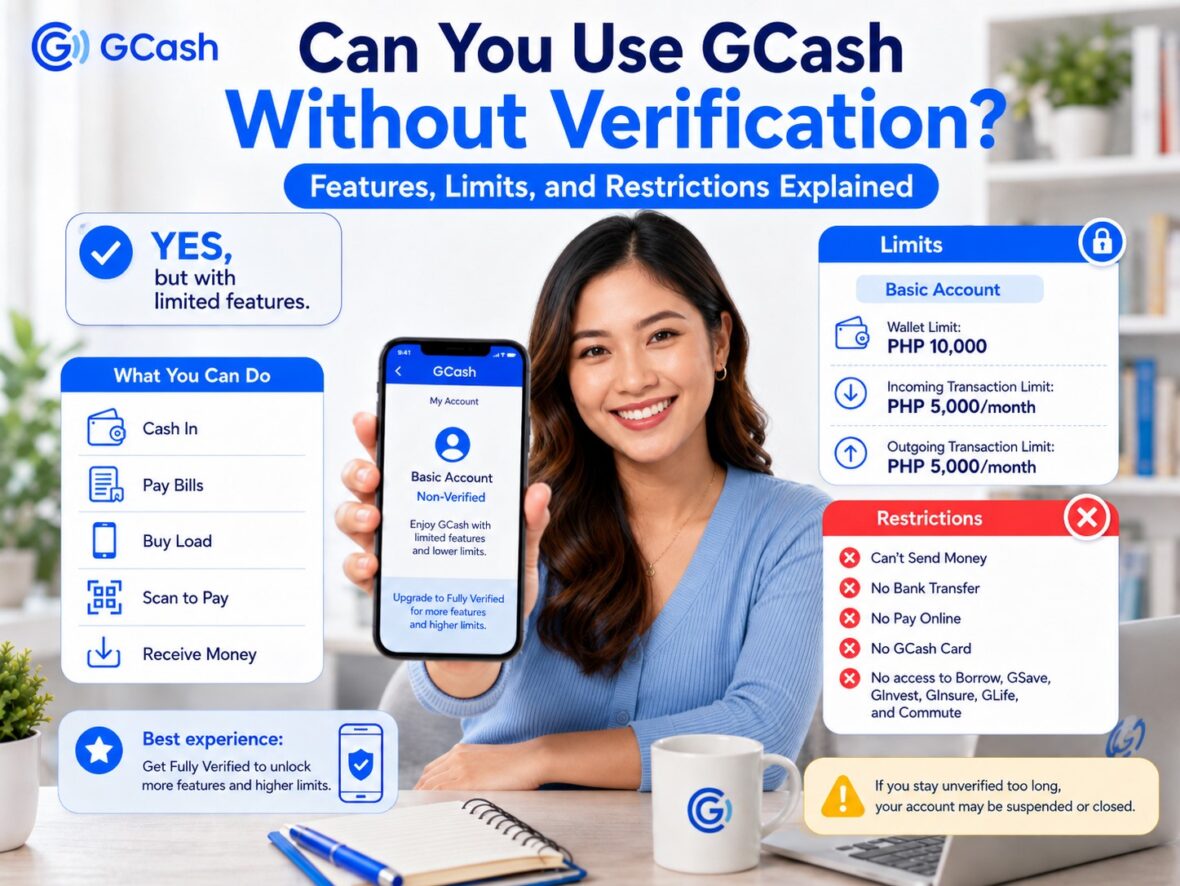
Yes, you can use GCash without full verification—but only for a limited number of transactions. A newly registered, non-verified account is classified as a Basic GCash account. It can be useful for simple activities such as buying load, paying bills, cashing in, and scanning merchant QR codes.
However, several of GCash’s most important features remain unavailable. You cannot use Express Send, transfer money to a bank, pay through regular online GCash checkout pages, order a GCash Card, or access services such as GSave and GLoan.
There is also an important time limit to remember. GCash currently requires users to complete verification within 12 months of creating their accounts. Leaving an account unverified may eventually lead to restrictions, suspension, maintenance fees, and account closure.
This guide explains exactly what you can and cannot do with GCash without verification, how much money a Basic account can hold, and what may happen if you never upgrade.
Content
Can You Use GCash Without Verification?
Yes. After registering your mobile number and creating an MPIN, you can use GCash as a Basic account without immediately submitting a government-issued ID.
GCash’s official account comparison lists the following features for Basic users:
- Cash In
- Pay Bills
- Buy Load
- Scan to Pay
A separate GCash support page confirms that a Basic user may also receive money from a Fully Verified GCash account. However, the Basic user cannot send money through Express Send.
This means an unverified account is not completely unusable. You can perform several everyday transactions, but the account is much more restricted than a Fully Verified profile.
What Is a Basic GCash Account?
A Basic GCash account is a new or non-verified profile.
You receive this account status after completing the initial GCash registration but before passing full identity verification. You may have already entered your name, birthday, address, and other information, but GCash has not yet confirmed your identity using an accepted ID and selfie scan.
Every new personal GCash account starts with a Basic profile. Full verification unlocks additional features and higher wallet and transaction limits.
You can check your current status by opening GCash and tapping Profile. Your account should display a status such as:
- Basic
- Fully Verified
- GCash Jr.
- GCash Plus
- Another applicable profile category
What Can You Do With GCash Without Verification?
A Basic GCash account supports several useful services.
1. Cash In to Your GCash Wallet
You can add money to a Basic GCash wallet through available cash-in methods.
The exact methods displayed may depend on your account, location, bank, and current GCash services. However, any incoming transaction must remain within your Basic account’s wallet and monthly incoming limits.
A Basic account currently has:
- A maximum wallet balance of ₱10,000
- A monthly incoming limit of ₱5,000
The incoming limit counts the total amount received during the month—not only the amount remaining in your wallet.
For example, imagine that you receive ₱3,000 and spend it all. You then receive another ₱2,000. Even though your current balance is only ₱2,000, you have already received a total of ₱5,000 during the month.
You may therefore be unable to receive another cash-in until the monthly limit resets.
2. Pay Bills
You can use a Basic GCash account to pay participating billers.
Depending on what is currently available in the app, these may include selected:
- Electricity providers
- Water companies
- Internet providers
- Mobile postpaid accounts
- Government agencies
- Credit-card issuers
- Insurance providers
- Schools
- Loan companies
- Transportation services
Pay Bills is included in GCash’s official list of Basic account features.
However, the payment must fit within your wallet balance and outgoing limit. Basic accounts currently have a total monthly outgoing limit of ₱5,000.
Individual billers may also impose their own minimum payments, maximum payments, convenience fees, and posting periods.
3. Buy Mobile and Other Prepaid Load
Basic users can purchase supported load products through GCash.
These may include:
- Prepaid mobile load
- Data promos
- Prepaid broadband packages
- Gaming credits
- Entertainment products
- Other prepaid services shown in the app
Buy Load is available to both Basic and Fully Verified users.
Always review the mobile number and selected promo before paying. A successful load purchase sent to an incorrect number can be difficult to recover.
4. Pay Merchants Through Scan to Pay
A Basic account can scan supported merchant QR codes and pay using its available wallet balance.
The normal process is:
- Open GCash.
- Tap QR or Scan QR.
- Scan the merchant’s code.
- Enter the payment amount when required.
- Check the merchant or recipient name.
- Confirm the transaction.
Scan to Pay is included in the official Basic feature list.
Before confirming, make sure the merchant name displayed in the app matches the store or business you are paying. Be particularly careful with printed QR codes because scammers may place a different QR sticker over the legitimate code.
5. Receive Money From a Fully Verified GCash User
A Fully Verified user may send money to a Basic GCash account.
GCash displays a notice to the sender indicating that the recipient is non-verified. Once the transfer is completed, the Basic user may receive the money, provided that the transaction does not exceed the account’s wallet or incoming limits.
However, receiving money does not unlock the ability to send it elsewhere.
A Basic user can receive funds but cannot use Express Send to transfer them to another GCash account.
That restriction can create a frustrating situation. You may have money in your wallet but be unable to forward it to another person or transfer it to your bank.
GCash Basic Account Limits
GCash applies much lower limits to Basic accounts than to Fully Verified accounts.
| Limit | Basic GCash account | Regular Fully Verified account |
|---|---|---|
| Maximum wallet balance | ₱10,000 | ₱100,000 |
| Monthly incoming limit | ₱5,000 | ₱100,000 |
| Daily outgoing limit | No separate daily amount listed | ₱100,000 |
| Monthly outgoing limit | ₱5,000 | No separate general monthly amount listed |
The wallet limit is the maximum amount you can keep in GCash at one time. The incoming limit is the total amount you can receive during the applicable period, while the outgoing limit covers money spent or transferred from the wallet.
The absence of a separate daily or monthly general limit does not necessarily mean that every transaction is unlimited. Individual services may impose their own transaction amounts, frequency restrictions, and security checks.
You can check the limits assigned to your particular account by going to:
Profile → Profile Limits
When Do Basic GCash Limits Reset?
The Basic account’s monthly incoming and outgoing limits generally reset at the beginning of the next month.
For example, suppose you reach your ₱5,000 monthly outgoing limit on July 20. You may need to wait until August 1 before the applicable monthly allowance becomes available again.
Spending your remaining wallet balance, reinstalling GCash, changing phones, or logging out will not reset the transaction count or monthly amount.
Getting Fully Verified increases the standard limits to the Fully Verified profile level. GCash states that completing verification raises the standard limit to ₱100,000.
What Can’t You Do Without GCash Verification?
The most important limitations affect money transfers, online payments, cards, and other financial services.
1. You Cannot Send Money Through Express Send
A Basic GCash account cannot send money to another GCash user through Express Send.
This remains true even when:
- The wallet has enough balance.
- You previously received the money from a Fully Verified user.
- The recipient is Fully Verified.
- The amount is small.
- The transaction is urgent.
GCash clearly states that non-verified or Basic users can receive money but cannot send it.
To unlock Express Send, you need to complete full verification.
2. You Cannot Transfer Money to Banks or Other E-Wallets
Bank Transfer is included only under the Fully Verified feature set.
Without verification, you cannot normally use the GCash local-transfer function to send money to institutions such as:
- BPI
- BDO
- UnionBank
- Metrobank
- LandBank
- Maya
- Other supported banks and e-wallets
This is important if you receive funds through GCash but eventually want to move them into a bank account.
Do not cash in or accept a large amount into an unverified account while assuming you can easily transfer it later.
3. You Cannot Use the Regular Pay Online Feature
GCash’s Pay Online service requires a Fully Verified account.
This feature is commonly used when paying through:
- Online shopping websites
- Food-delivery apps
- Travel-booking platforms
- Digital subscriptions
- Mobile apps
- Supported merchant checkout pages
Your ability to scan a merchant QR code does not mean your Basic account can automatically use GCash on every online checkout page.
4. You Cannot Order a GCash Card
The GCash Visa Card is available to Fully Verified GCash and eligible GCash Jr. users.
A Basic adult account cannot order the card.
The GCash Card can be used for eligible in-store and online Visa payments and compatible ATM withdrawals. Because these functions involve broader access to wallet funds, verification is required.
5. You Cannot Use RCBC Scan to Withdraw
RCBC Scan to Withdraw allows eligible users to withdraw money at supported RCBC ATMs without using a physical card.
GCash specifically requires the account holder to be Fully Verified for this service.
A Basic user therefore cannot rely on RCBC Scan to Withdraw as a way to access wallet funds.
GCash’s general Basic feature list also does not include Cash Out. While partner-outlet procedures may differ, check your account’s current eligibility before adding funds that you expect to withdraw as cash.
6. You Cannot Access GSave
GSave provides access to savings accounts offered by participating partner banks.
It is included in GCash’s Fully Verified feature list, not the Basic feature set.
A Basic user cannot normally open and manage a regular GSave account through the app.
Remember that a GSave account is a separate banking product provided by a partner institution. Becoming Fully Verified unlocks access, but the user may still need to accept the partner bank’s terms and meet its requirements.
7. You Cannot Access GInvest
GCash lists GInvest among the features available after full verification.
Becoming verified does not guarantee investment returns or remove other onboarding requirements. Eligible users may still need to complete a risk assessment, read product disclosures, and meet the conditions of a particular fund.
8. You Cannot Access GInsure
GInsure is also part of the Fully Verified feature set.
Available products may include selected health, accident, travel, device, or other types of insurance from partner providers.
Each policy has its own premiums, benefit limits, exclusions, waiting periods, and claims requirements.
9. You Cannot Access Regular Borrowing Features
GCash lists Borrow among the features unlocked through full verification.
Borrowing products may include services such as:
- GLoan
- GCredit
- GGives
However, becoming Fully Verified does not guarantee that these products will appear or that an application will be approved. Full verification only satisfies one of the basic access requirements. Separate eligibility, account-activity, credit, and product rules may still apply.
10. You Cannot Access GLife and Certain Commute Services
GLife and Commute are also listed under the Fully Verified features.
The exact merchants and transportation services available may change, but a Basic account does not receive the full set of in-app services.
Can You Receive Money Without Verification?
Yes, but there are limitations.
A Fully Verified user can send money to a Basic account. The sender will see that the recipient is non-verified before completing the transfer.
The transfer may fail when:
- The recipient has reached the ₱5,000 monthly incoming limit.
- The money would increase the wallet balance beyond ₱10,000.
- The sender has reached an applicable transaction limit.
- The recipient’s account is restricted or suspended.
- A temporary technical issue affects the service.
Even when the money arrives successfully, the Basic recipient cannot use Express Send or Bank Transfer to move it.
The recipient may be limited to using the balance for services such as bills, load, and merchant QR payments.
Can You Send Money Without Verification?
No. Basic users cannot use Express Send.
This is one of the clearest differences between a registered account and a Fully Verified account.
Entering your personal details during registration does not count as full verification. You must submit an accepted ID, complete the selfie scan, and receive approval.
Can You Pay Bills Without Verification?
Yes.
Pay Bills is an official Basic-account feature.
However, you remain subject to:
- The ₱10,000 maximum wallet balance
- The ₱5,000 monthly incoming limit
- The ₱5,000 monthly outgoing limit
- The biller’s payment limits
- Applicable convenience fees
- The biller’s posting period
Suppose you already spent ₱4,500 through other Basic-account transactions during the month. You may have only ₱500 remaining under your monthly outgoing limit, even when your wallet contains more money.
Can You Buy Load Without Verification?
Yes.
Basic users can buy load and supported prepaid products.
Check the number carefully before confirming because the purchase may be processed immediately.
Also review any convenience fee and the exact promo inclusions. Two similarly named load products may have different validity periods or usage conditions.
Can You Pay Through QR Without Verification?
Yes.
Scan to Pay is available to Basic accounts.
This usually makes it possible to pay participating stores, restaurants, and other merchants, provided that:
- Your wallet has sufficient balance.
- You remain within the outgoing limit.
- The merchant’s QR code is valid.
- The GCash service is available.
- The transaction passes GCash’s security checks.
Always verify the displayed recipient before paying.
Can You Use GCash for Online Shopping Without Verification?
The regular GCash Pay Online feature requires full verification.
A Basic user may be able to pay a physical or participating merchant through Scan to Pay, but this is different from selecting GCash as the payment method on a website or app.
For consistent online-payment access, become Fully Verified before shopping.
Can You Withdraw Money Without Verification?
Do not assume that every GCash withdrawal method is available to a Basic user.
The GCash Card requires full verification, and RCBC Scan to Withdraw explicitly requires a Fully Verified account.
GCash also offers cash-out services through participating outlets. Its published partner-outlet instructions require the user’s mobile number, a valid ID, and OTP confirmation, although that general page does not clearly state the verification status required for every outlet and account.
Availability can therefore depend on your account and the cash-out channel. Check the Cash Out section inside your app or ask the official outlet about current eligibility before proceeding.
The safer approach is to become Fully Verified before treating GCash as a wallet from which you can freely withdraw or transfer funds.
Can You Keep Using a Basic GCash Account Forever?
No—not under GCash’s current policy.
GCash says users are required to verify their accounts within 12 months of account creation.
If you do not complete verification within that period, your account may be restricted.
The next outcome depends partly on whether your wallet has a remaining balance.
What Happens if Your Unverified Balance Is Zero?
GCash says that if an unverified account has a zero balance, the account will be closed.
This means you should not assume that an unused Basic account will remain available indefinitely.
What Happens if Your Unverified Account Still Has Money?
When an unverified account still contains funds, GCash says the account may be suspended and charged a ₱30 monthly Basic Account Maintenance Fee.
According to the current GCash guidance, the maintenance fee begins after suspension and continues until:
- The balance reaches zero, or
- Ten years have passed,
whichever happens first.
After that, the account may be deactivated and permanently closed.
This is a serious reason not to leave funds sitting in an unverified account.
What if Your Basic Account Has Already Been Suspended?
GCash says users with funds in a suspended Basic account generally have two options:
- Verify the existing account.
- Create a new GCash account and request a transfer of the funds.
The request can be initiated through Gigi in the GCash Help Center.
Follow the instructions shown for your account. Do not ask an unofficial social-media agent to recover or transfer the funds.
Why Does GCash Require Verification?
GCash says verification is required within 12 months under its compliance requirements and describes it as necessary for full feature access and account security.
Verification helps confirm that:
- The account belongs to a real person.
- The submitted identity matches the account information.
- One person is not creating unlimited anonymous accounts.
- Financial services are being used under the appropriate account type.
- The account can access higher-risk features such as transfers and borrowing.
The process generally requires one accepted government-issued ID and a selfie scan.
How to Upgrade a Basic GCash Account
To become Fully Verified:
- Open the official GCash app.
- Tap Profile.
- Select Verify Now.
- Tap Get Started.
- Read the reminders and tap Next.
- Enter the six-digit code sent to your number.
- Enter your birthday and confirm your citizenship.
- Select and scan an accepted ID.
- Complete the selfie scan.
- Review your information.
- Tap Submit.
GCash says applicants should receive an SMS update after three days.
What IDs Can You Use?
For Filipino adults aged 18 and above with a Philippine SIM, GCash currently accepts:
- National ID in supported card, paper, or digital form
- Philippine passport
- Pag-IBIG Loyalty Plus Card
- Driver’s license or BLTO driver’s license
- Philippine Postal ID
- PRC ID
- UMID
- SSS ID
The identification document must be valid, clear, and not seriously damaged.
GCash has separate ID requirements for GCash Jr., GCash Overseas, foreign residents, and GTourist accounts.
What if You Do Not Have a Valid ID?
GCash recommends obtaining a National ID when you do not have one of its accepted identification documents.
Do not attempt to verify using:
- Another person’s ID
- A fake or altered document
- Someone else’s selfie
- An unofficial verification service
- A paid “inside agent”
Your name, account details, ID, and face scan should all belong to the actual account owner.
Basic vs. Fully Verified GCash Account
Here is a broader comparison:
| Feature | Basic | Fully Verified |
|---|---|---|
| Cash In | Yes | Yes |
| Pay Bills | Yes | Yes |
| Buy Load | Yes | Yes |
| Scan to Pay | Yes | Yes |
| Receive money | Yes, within limits | Yes |
| Express Send | No | Yes |
| Bank Transfer | No | Yes |
| Pay Online | No | Yes |
| GCash Card | No | Yes |
| GSave | No | Yes |
| GInvest | No | Yes |
| GInsure | No | Yes |
| Borrow | No | Access subject to eligibility |
| GLife | No | Yes |
| Commute | No | Yes |
| Standard wallet limit | ₱10,000 | ₱100,000 |
| Standard monthly incoming limit | ₱5,000 | ₱100,000 |
| Verification deadline | Within 12 months | Already completed |
GCash’s official comparison shows that full verification unlocks all Basic features plus transfers, online payments, cards, savings, investments, insurance, borrowing access, GLife, and Commute.
Is It Safe to Receive Money in an Unverified Account?
It may be possible, but it is not always practical.
Before receiving money, consider these questions:
- Is the amount within your remaining incoming limit?
- Will it increase your balance beyond ₱10,000?
- Do you need to send it to another person?
- Do you need to transfer it to a bank?
- Do you need to withdraw it immediately?
- Is your account close to the 12-month verification deadline?
When you need to transfer or withdraw the money, a Basic account may not provide the service you expected.
For important funds such as salary, rent, tuition, emergency money, or remittances, become Fully Verified first whenever possible.
Should You Verify Your GCash Account?
For most regular users, yes.
Staying Basic may be enough when you only want to:
- Test how GCash works
- Buy small amounts of load
- Pay a limited bill
- Make occasional merchant QR payments
- Receive a small amount for direct spending
Full verification is the better option when you want to:
- Send money to family or friends
- Transfer funds to a bank
- Shop online
- Order a GCash Card
- Receive larger amounts
- Access savings products
- Explore investments or insurance
- Become eligible for borrowing products
- Avoid the long-term consequences of remaining unverified
Verification also raises the regular wallet limit from ₱10,000 to ₱100,000.
Tips for Using a Basic Account Safely
Check Your Remaining Limits
Open:
Profile → Profile Limits
Do this before asking someone to send money or before starting a cash-in.
Do Not Store More Money Than Necessary
A Basic account has limited options for moving and withdrawing funds.
Use only the amount needed for the bills, load, or QR purchases you plan to make.
Verify Before Receiving Important Funds
Do not wait until salary, emergency money, or a remittance is already in the wallet.
Keep Transaction Receipts
Save screenshots or reference numbers for important payments.
Never Pay Someone to Verify Your Account
Verification is performed through the official GCash app.
Never Share Your OTP or MPIN
An unofficial agent may claim that these details are needed to upgrade the account. They are not.
Do Not Click Unexpected Verification Links
Open the GCash app yourself and go directly to Profile → Verify Now.
Frequently Asked Questions
Can I use GCash without a valid ID?
You can create and use a Basic account without initially submitting a government-issued ID. However, an accepted ID is required for full verification. A Basic account has limited features and must be verified within the applicable 12-month period.
Can an unverified GCash account receive money?
Yes. A Fully Verified user can send money to a Basic account, provided that the transaction remains within the recipient’s wallet and incoming limits.
Can an unverified account send money?
No. Basic users cannot use Express Send.
Can a Basic account transfer money to a bank?
No. Bank Transfer is listed as a Fully Verified feature.
Can I pay bills without verification?
Yes. Pay Bills is available to Basic users, subject to the account’s balance and transaction limits.
Can I buy load without verification?
Yes. Buy Load is included in the Basic feature set.
Can I scan a QR code without verification?
Yes. Basic accounts can use Scan to Pay.
Can I use GCash for online shopping without verification?
The regular Pay Online feature requires a Fully Verified account.
Can I order a GCash Card without verification?
No. GCash says Fully Verified GCash and eligible GCash Jr. users can order the GCash Card.
Can I withdraw through RCBC without verification?
No. RCBC Scan to Withdraw requires a Fully Verified account.
What is the maximum balance for an unverified GCash account?
A Basic account currently has a maximum wallet balance of ₱10,000.
How much can an unverified account receive?
The current monthly incoming limit for a Basic profile is ₱5,000.
How much can a Basic account spend?
A Basic account currently has a general monthly outgoing limit of ₱5,000.
When do the monthly limits reset?
Monthly limits generally reset at the beginning of the next calendar month.
How long can I remain unverified?
GCash says users must verify their accounts within 12 months of creating them.
Will GCash close an unverified account?
GCash says an unverified account with a zero balance may be closed. If it still has a balance, it may be suspended and charged a ₱30 monthly maintenance fee before eventual deactivation and permanent closure under the stated policy.
Will I lose my balance if my Basic account is suspended?
GCash provides a process for claiming funds from a suspended Basic account. You may verify the existing account or create another account and request a fund transfer through official support.
How long does verification take?
GCash says verification applications are processed and SMS updates are sent within three days.
Does becoming Fully Verified automatically give me GLoan?
No. Full verification unlocks the Borrow section, but loan and credit products remain subject to separate eligibility and approval requirements.

Final Thoughts
You can use GCash without verification, but only as a Basic account.
You can cash in, pay bills, buy load, scan merchant QR codes, and receive a limited amount of money. However, you cannot use Express Send, transfer funds to a bank, pay through regular online GCash checkout pages, order a GCash Card, or access major services such as GSave, GInvest, GInsure, and Borrow.
The limits are also quite restrictive. A Basic account can hold up to ₱10,000, receive up to ₱5,000 per month, and spend or send out up to ₱5,000 per month under the current general profile limits.
More importantly, GCash now requires accounts to be verified within 12 months of creation. An account that remains unverified may be restricted, suspended, charged a monthly maintenance fee, and eventually closed.
For occasional load purchases or small QR payments, a Basic account may be enough temporarily. But for anyone who plans to use GCash regularly, becoming Fully Verified is the practical and safer choice.
Complete verification before receiving important funds—not after you discover that the money cannot be transferred or withdrawn in the way you expected.