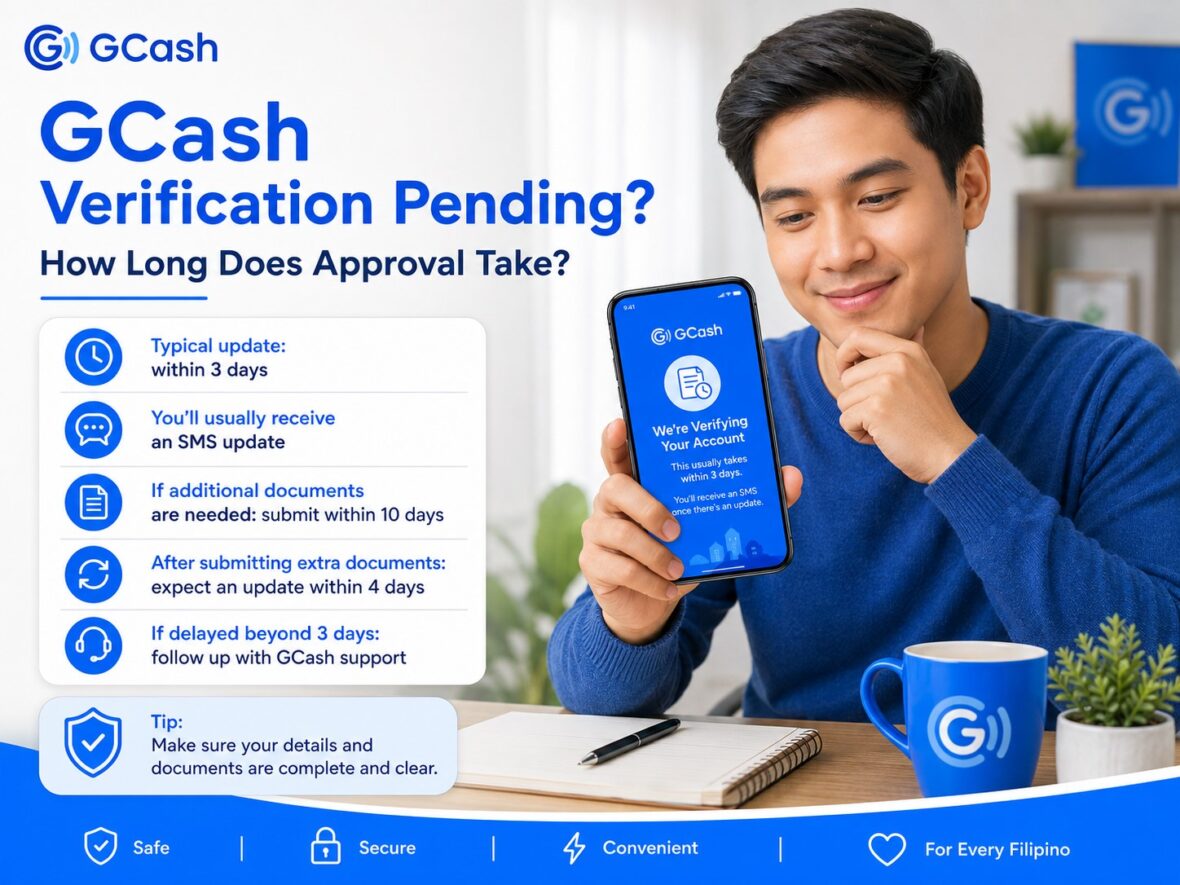
You completed the ID scan, took your selfie, reviewed your personal information, and finally tapped Submit. However, instead of seeing “Fully Verified,” your GCash account still says:
“We’re Verifying Your Account.”
At first, this is completely normal. GCash needs time to review the information and documents you submitted. But when several hours turn into several days, it is understandable to start worrying.
Did you do something wrong? Should you submit another application? Is your ID acceptable? Can you still use your account while waiting?
In this guide, we will explain how long GCash verification normally takes, what the different verification status messages mean, and what you should do when your application remains pending.
Content
How Long Does GCash Verification Take?
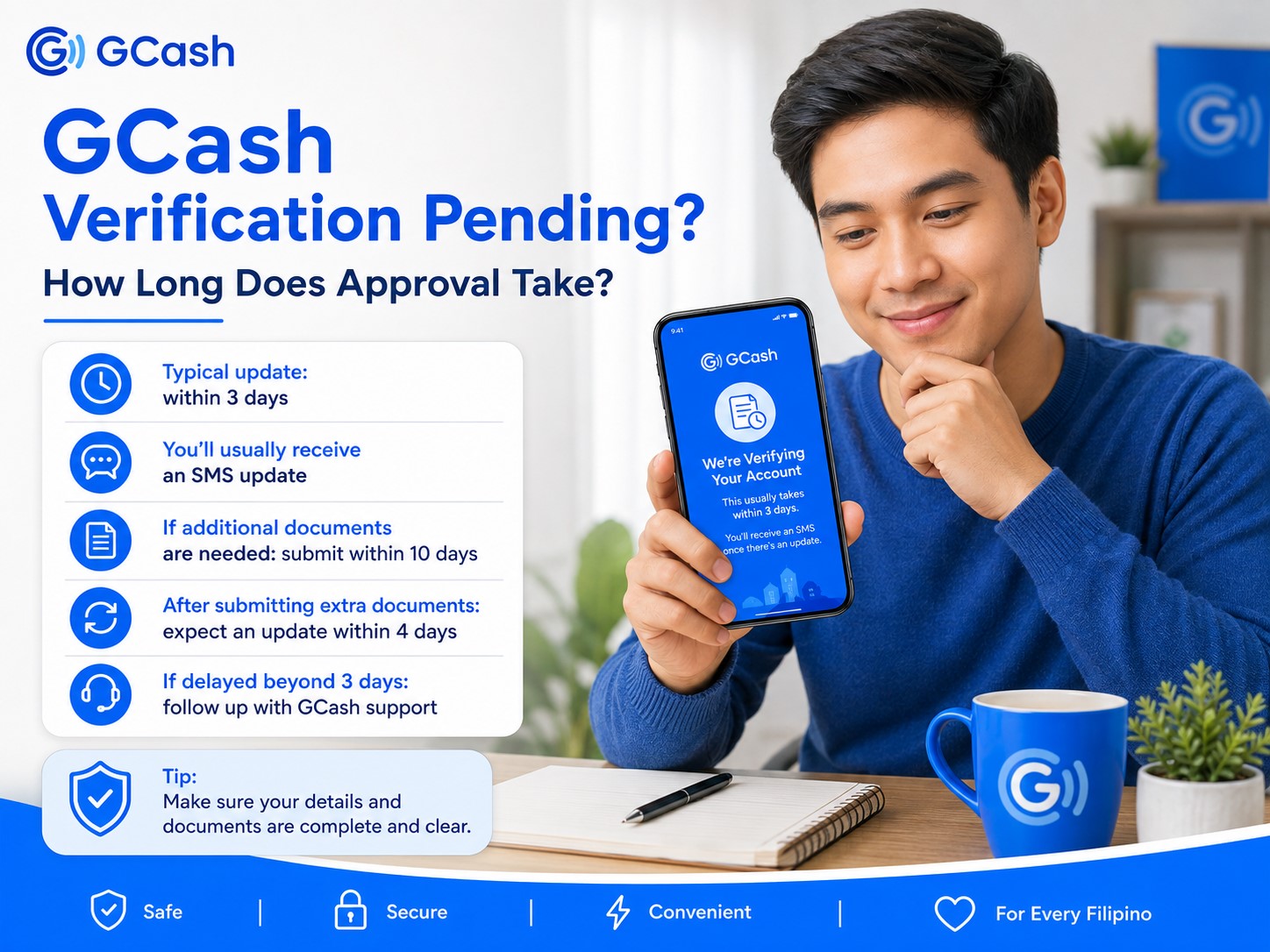
GCash officially states that it processes verification applications and sends an update through SMS within three days.
This means you should generally expect to receive an approval, rejection, or request for additional documents within three days after successfully completing and submitting the verification process.
Some users may receive an update earlier, but you should not assume that verification will be instant. Even when your friend was approved within a few minutes, your application may still require the full review period.
The important thing is to make sure you completed every step and reached the final submission page.
The standard verification process includes:
- Opening GCash and tapping Profile
- Selecting Verify Now
- Entering the six-digit code sent to your number
- Providing your birthday and citizenship
- Scanning an accepted ID
- Completing the selfie scan
- Reviewing your information
- Tapping Submit
GCash says an SMS update should be sent after the application is submitted.
Quick Summary of GCash Verification Timelines
Here is a simple overview of the most important waiting periods:
| Verification situation | Expected timeline |
|---|---|
| Regular verification application | SMS update within 3 days |
| No update after regular submission | Follow up after 3 days |
| Response after submitting a verification follow-up | Support should reach out within 24 hours |
| Additional documents requested | Submit within 10 days |
| Review after additional documents are submitted | SMS update within 4 days |
| Five failed selfie attempts | Wait 24 hours before trying again |
| Technical verification issue escalated to support | Support should get in touch within 24 hours |
These are the timelines currently published by the GCash Help Center.
What Does “We’re Verifying Your Account” Mean?
When the GCash app shows “We’re Verifying Your Account,” your application has generally been received and is still under review.
You do not normally need to submit another application immediately.
GCash advises users who see this message to wait for the regular three-day processing period. If no SMS update arrives after three days, you may use the verification follow-up option provided in the Help Center. GCash says its support team should reach out within 24 hours after the follow-up is submitted.
While waiting, keep access to:
- Your registered mobile number
- The email address connected to your support request
- Your GCash app
- The ID you submitted
- Any additional identification documents you may need
GCash may send an update through SMS or ask you to continue the process inside the app.
When Should You Start Counting the Three Days?
The waiting period should begin after you have completed the entire verification process and tapped the final Submit button.
Simply opening the verification page, scanning your ID, or completing the selfie does not necessarily mean your application was successfully submitted.
Before you start waiting, confirm that:
- You completed the ID scan.
- You completed the selfie scan.
- You reviewed your personal information.
- You tapped Submit.
- The app now displays a verification status instead of asking you to continue.
If the app still says Verify Now, your submission may not have been completed.
How to Check Your GCash Verification Status
You do not need to guess whether your application is still being processed.
To check your status:
- Open the GCash app.
- Tap Profile.
- Tap Verify Now or the verification status shown near your profile.
- Read the message displayed on the screen.
Your next step depends on the exact message you see.
Status 1: “We’re Verifying Your Account”
This message means the application is still under review.
What you should do
Wait until the three-day processing period has passed.
Do not repeatedly restart verification during this period unless GCash specifically asks you to do so. A new attempt may not speed up the existing review.
If you have not received an update after three days, use the verification follow-up option in the official GCash Help Center. GCash says its support team should reach out within 24 hours after you follow up.
Status 2: “Upgrade Your GCash—Verify Now”
This message does not normally mean that an application is still pending.
According to GCash, it may mean that:
- You have not started the verification process.
- You started but did not finish your most recent attempt.
- You finished the process, but your latest application was rejected.
To continue, tap Verify Now and complete the required steps. After successfully submitting the new application, expect an SMS update within three days.
This is an important distinction. Waiting another three days will not help when the app is asking you to restart or finish the process.
Status 3: “Please Complete Your Verification”
This message means GCash needs additional documents from you.
Tap Continue Verification to see what documents are required. You must submit the requested documents within 10 days.
After successfully submitting the additional documents, GCash says you should receive an SMS update within four days. If you fail to provide the documents within the 10-day period, you will need to restart the verification process.
Do not ignore this message while waiting for automatic approval. Your application cannot move forward until you provide the requested information.
Status 4: “Unable to Verify” or “Can’t Submit”
This is usually a technical or submission problem rather than a pending application.
Possible causes include:
- Reaching the maximum number of selfie attempts
- GCash not having permission to use your camera
- Using an unsupported device
- The app being unable to detect your face clearly
GCash advises users who reach the maximum selfie attempts to wait 24 hours before trying again. It also recommends enabling camera access, trying another compatible phone or tablet, and following the face-scan instructions carefully.
If none of those steps works, you may contact support. GCash says its team should get in touch within 24 hours for this type of technical verification concern.
Status 5: Verification Rejected
A rejected application is different from a pending application.
GCash advises users to check the SMS notification for the reason their verification was rejected. Common problems include an unsuccessful selfie, poor ID image quality, mismatched information, or failure to meet an account policy requirement.
Depending on the rejection reason, you may be allowed to correct and resubmit your application within 10 days. When you miss the deadline, you may need to restart the entire process.
Why Is My GCash Verification Taking So Long?
Even though GCash gives a three-day processing timeline, several issues may prevent an application from being approved immediately.
1. You Did Not Finish the Application
You may have scanned your ID and completed the selfie but closed the app before tapping Submit.
Return to:
Profile → Verify Now
If the app asks you to continue, complete the remaining steps.
GCash says the “Upgrade Your GCash—Verify Now” message may appear when the user has not started verification, did not finish the latest attempt, or had a previous application rejected.
2. GCash Needs Additional Documents
Some applications require additional information before they can be approved.
When the app displays “Please Complete Your Verification,” tap Continue Verification and submit the requested documents within 10 days. Once submitted, the additional-document review may take up to four days.
Your application will not automatically move forward while the required documents are missing.
3. Your ID Photo Needs Additional Review
GCash requires an accepted ID that is:
- Valid and unexpired
- Clear and undamaged
- The actual physical ID, except for supported National ID formats
For Filipino adults aged 18 and above using a Philippine SIM, the accepted list currently includes the National ID, passport, Pag-IBIG Loyalty Plus Card, driver’s license, Postal ID, PRC ID, UMID, and SSS ID.
An unclear, cropped, damaged, expired, or unsupported ID may delay the process or result in rejection.
4. Your Information Does Not Match Your ID
The personal details entered in GCash should match your identification document.
Possible mismatches include:
- A misspelled name
- An incorrect birthday
- A missing middle name
- A nickname instead of your legal name
- A maiden name in one place and a married name in another
- An incorrectly entered ID number
GCash advises users to make sure the information entered in the app exactly matches the information on the ID.
5. The Selfie Scan Was Unclear
The face scan may require another attempt when your image was blurry, dark, covered, or difficult to compare with your ID.
For a successful selfie scan, GCash recommends:
- Taking the selfie in a bright area
- Using a simple background without other people
- Keeping your face clear and fully visible
- Removing glasses and face masks
- Following the movements requested in the app
- Holding the phone as directed
After five failed attempts, wait 24 hours before trying again.
6. You Reached the GCash Account Ownership Limit
GCash currently permits one person to have up to five Fully Verified personal GCash accounts.
If you have already reached this limit, another account may be unable to proceed with full verification. GCash identifies the Account Ownership Limit as one possible reason an application may not meet its internal policy requirements.
This can sometimes happen when you previously registered old or forgotten mobile numbers.
When you believe the decision is a mistake and have valid proof, contact official GCash support for further review.
7. There Is a Technical Problem With Your Phone
Verification may fail to submit correctly when:
- Camera permission is disabled.
- The front or rear camera is damaged.
- Your device is unsupported.
- The GCash app is outdated.
- Your internet connection is unstable.
- The app closes during submission.
GCash advises enabling camera access and trying another compatible phone or tablet when the current device cannot complete verification.
Using another phone is acceptable for troubleshooting, but you should still use your own mobile number, identification, personal information, and face.
8. Verification Services Are Experiencing an Issue
GCash may occasionally experience technical interruptions affecting access to account verification.
When your app is working normally but the verification feature will not load or submit, check the official GCash Help Center and in-app advisories before making repeated attempts.
Avoid relying on unofficial social media posts, comments, or supposed agents for outage information.
What to Do if Verification Has Been Pending for Less Than Three Days
When the app shows “We’re Verifying Your Account” and fewer than three days have passed, the best action is generally to wait.
While waiting:
- Keep your SIM active.
- Check your SMS messages.
- Check your GCash app inbox.
- Make sure your phone can receive notifications.
- Avoid uninstalling the app unnecessarily.
- Do not create another GCash account just to bypass the review.
- Do not submit repeated applications unless instructed.
Remember that approval is not guaranteed to be instant. The official processing period is up to three days.
What to Do if Verification Has Been Pending for More Than Three Days
Once three days have passed without an SMS update, check your status again.
Step 1: Open GCash
Log in to the official GCash app.
Step 2: Go to Profile
Tap Profile, then select Verify Now or your verification status.
Step 3: Read the Message
Determine whether the app says:
- We’re Verifying Your Account
- Upgrade Your GCash—Verify Now
- Please Complete Your Verification
- Unable to Verify
Do not file a general complaint before checking this page. The displayed message tells you what action is needed.
Step 4: Follow Up if the Review Is Still Pending
If the screen still says “We’re Verifying Your Account” and no update arrived after three days, use the verification follow-up option in the official Help Center.
GCash says support should reach out within 24 hours after you submit the follow-up.
Step 5: Monitor Your Email and SMS
Check:
- Your regular email inbox
- Your spam or junk folder
- Your SMS messages
- Your GCash app inbox
- Your support-ticket status
Do not submit multiple tickets about the same issue unless GCash specifically asks you to do so.
How to Contact GCash Support About Pending Verification
The safest way to get help is through the official GCash app or Help Center.
You can generally begin by:
- Opening GCash.
- Tapping Profile.
- Selecting Help.
- Searching for “verification pending” or “account still not verified.”
- Opening the article that matches your concern.
- Using the available follow-up or support option.
GCash recommends searching the Help Center using the feature name plus two to five keywords describing the problem. It also warns users never to share an OTP or MPIN and not to click links sent through SMS or email.
When submitting a concern, prepare the following:
- Your GCash-registered mobile number
- Your full name
- The date you submitted verification
- The exact status displayed in the app
- A screenshot of the status or error
- The type of ID you used
- Your support-ticket number, if available
Never include your MPIN, OTP, Card PIN, or CVV.
Should You Submit Another Verification Application While One Is Pending?
Usually, no.
If the app clearly says “We’re Verifying Your Account,” allow the original application to complete its three-day review period.
You should restart or resubmit only when:
- The app asks you to tap Verify Now.
- GCash says your previous submission was rejected.
- You are asked to provide additional documents.
- The original submission was never completed.
- Support instructs you to try again.
Repeatedly submitting the same unclear ID or selfie is unlikely to solve the underlying problem.
What Can You Do While Your Verification Is Pending?
Until GCash approves the application, your account normally remains a Basic profile.
A Basic account can access selected services such as:
- Cash In
- Pay Bills
- Buy Load
- Scan to Pay
Features reserved for Fully Verified users include:
- Send Money
- Bank Transfer
- Online payments
- GCash Card
- Borrowing services
- GSave
- GInvest
- GInsure
- GLife
- Selected commuting services
This means you may be able to perform some transactions while waiting, but important transfer and financial features will remain unavailable until approval.
Be careful about adding a large amount to a Basic account when you still cannot access the transfer method you need.
Can Someone Send Money to an Account With Pending Verification?
A Basic account may have limited incoming capabilities, subject to its wallet and transaction limits.
However, receiving money does not automatically give the Basic user access to Express Send, bank transfers, or other Fully Verified features.
Before asking someone to send you money, check your current profile limits and confirm that you will be able to use the funds for your intended transaction.
Can You Speed Up GCash Verification?
There is no legitimate paid service or special agent who can guarantee immediate approval.
The best way to avoid unnecessary delays is to submit a clean and accurate application from the beginning.
Before verifying:
- Update the GCash app.
- Use a stable internet connection.
- Prepare an accepted, unexpired ID.
- Clean your camera lens.
- Take the ID photo in good lighting.
- Avoid glare and camera flash.
- Make sure the complete ID is visible.
- Enter your information exactly as shown on the ID.
- Complete the selfie against a plain background.
- Keep your face uncovered.
- Review everything before tapping Submit.
These steps cannot guarantee instant approval, but they reduce the chance of rejection or a request for resubmission.
GCash Verification Pending vs. Verification Failed
These messages should not be treated as the same problem.
| Status | What it generally means | What to do |
|---|---|---|
| We’re Verifying Your Account | Application is under review | Wait up to 3 days; follow up afterward |
| Upgrade Your GCash—Verify Now | Not started, incomplete, or rejected | Tap Verify Now and complete the process |
| Please Complete Your Verification | Additional documents are required | Submit them within 10 days |
| Unable to Verify | Technical, device, camera, or selfie issue | Troubleshoot and try again |
| Verification Rejected | Application was reviewed but not approved | Check SMS reason and correct the issue |
| Policy Requirements Not Met | Account may not meet an internal requirement | Review account limits or contact support |
Always follow the message shown inside your own app rather than assuming that another user’s solution applies to your situation.
Security Reminders While Waiting for Verification
Pending verification can make users impatient, which creates an opportunity for scammers.
You may receive a message or social media comment claiming that someone can:
- Approve your account immediately
- Remove the pending status
- Verify your account without an ID
- Contact an “inside agent”
- Upgrade your account for a fee
- Fix the application if you share your OTP
Do not respond.
GCash support should never need your:
- Four-digit MPIN
- Six-digit OTP
- Card PIN
- Card CVV
- Login credentials
- Remote access to your phone
GCash explicitly reminds users never to share their OTP or MPIN and not to click links received through SMS or email.
Complete all verification activities inside the official GCash app.
Frequently Asked Questions
How long does GCash verification normally take?
GCash says it processes verification applications and sends SMS updates within three days.
Is it normal for GCash verification to take three days?
Yes. Even when some users receive approval sooner, three days is the standard timeline currently published by GCash.
Does GCash mean three calendar days or three business days?
The current Help Center wording simply says “within three days.” It does not specify business days on the regular pending-verification page. For that reason, rely on the date shown in your submission and use the official follow-up option once three full days have passed.
Why does my GCash still say “We’re Verifying Your Account”?
Your application may still be under review. If fewer than three days have passed, continue waiting. If more than three days have passed without an SMS update, submit a verification follow-up through the official Help Center.
How long does GCash take after requesting additional documents?
You have 10 days to submit the requested documents. After successful submission, GCash says to expect an SMS update within four days.
What happens if I do not submit the additional documents?
When you fail to provide them within the 10-day period, you will need to restart the verification process.
Should I verify again when my application is pending?
Not when the app says “We’re Verifying Your Account.” Wait for the regular processing period and follow up after three days. Restart only when the app asks you to verify again or support instructs you to do so.
Can I close the GCash app while verification is pending?
Yes. You do not need to keep the app open while GCash reviews the application. Make sure your SIM remains active and check your SMS and app notifications for updates.
Will reinstalling GCash speed up verification?
No evidence from GCash suggests that reinstalling the app speeds up an application already under review. Reinstalling may be useful only when you are troubleshooting an app problem.
What if I accidentally entered the wrong information?
If the incorrect information causes rejection, check the SMS notification and follow the resubmission instructions. Make sure the corrected details exactly match your ID. GCash permits resubmission within 10 days for certain selfie and ID-quality errors.
What if my verification is pending but I urgently need to send money?
Send Money and Bank Transfer are Fully Verified features. If your account is still Basic, you may need to wait for approval or use another legitimate payment method.
Can a GCash employee approve my account manually?
Official support can review a delayed or possibly mistaken decision, but no unofficial person can guarantee approval. Use only the Help Center or support options available through the official GCash app.
How quickly will support respond after I follow up?
GCash says its support team should reach out within 24 hours after a pending-verification follow-up is submitted.
Can I verify my GCash account at a pawnshop?
GCash account verification is performed through the official app. Cash-in outlets and pawnshops should not ask for your MPIN, OTP, or selfie to verify your account.
Final Thoughts
A pending GCash verification does not automatically mean your application failed.
When your app says “We’re Verifying Your Account,” the normal step is to wait for the official three-day processing period. Keep checking your SMS and the verification page under Profile → Verify Now.
The message displayed in the app is your best guide.
If it says “Please Complete Your Verification,” submit the additional documents within 10 days. If it says “Upgrade Your GCash—Verify Now,” your previous attempt may have been incomplete or rejected. If it still says “We’re Verifying Your Account” after three days, use the official follow-up option.
Most importantly, do not pay anyone who promises instant approval. Never share your MPIN or OTP, and complete all verification steps only inside the official GCash app.
Waiting can be frustrating, especially when you need to make an urgent transaction. However, checking the correct status and following the appropriate timeline will usually get you closer to resolving the problem than repeatedly submitting the same application.