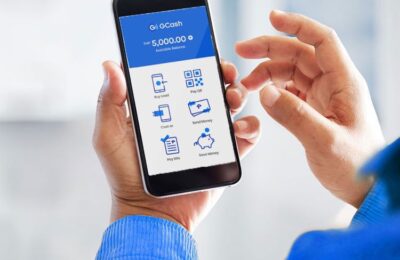
In today’s fast-paced world, having a convenient method for loading our television subscriptions can save both time and effort. GSAT, a leading satellite television service provider in Asia, offers various channels to entertain you and your family.
If you’re a GCash user, loading GSAT has never been easier. Here’s a step-by-step guide on how to get your favorite shows up and running using GCash.
Content
1. Login to your GCash app
First things first, open your GCash app on your smartphone. If you haven’t already logged in, enter your credentials to access your account.
2. Click View all
Once logged in, look for the “View All” option in the app. This will allow you to see all the available services you can avail through GCash.
3. Select Non-Telco load
In the list of services, choose the “non-telco load” option. This selection pertains to loading services outside of traditional telecommunication.
4. Input your mobile number – GCASH will send the PIN thru the provided mobile number
Enter the mobile number linked to your GCash account. This is where GCash will send a PIN for the transaction.
5. Choose Paytv and select the desired load and click PAY
Look for the “Paytv” option, select the GSAT load amount that fits your preference, and simply click “PAY.”
6. Wait for the SMS from GCASH containing the PIN
An SMS will be sent to your mobile number containing the PIN needed for loading. Keep this PIN handy as you will need it shortly.

7. Go to GSAT’s Web Loading Page
Open your web browser and head over toGSAT’s web loading page to proceed.
8. Input your box number on the first box
Enter your GSAT/GPinoy box number in the designated field.
9. Input the PIN sent by GCash
Key in the PIN that was sent to your mobile number by GCash.
10. Click submit and wait for the confirmation message to pop-up
Click on the “Submit” button and wait for a confirmation pop-up message that your loading was successful.
11. Check the subscription status of your GSAT/GPinoy box if it’s successfully loaded
You can now check your subscription status to see if your GSAT or GPinoy box has been successfully loaded and is ready to use.
For Failed Loading Transactions
If you encounter any issues during the loading process, don’t worry! GSAT Support is available to assist you:
LANDLINE: (02) 8882-9999
MOBILE:
09999904728
09178358002
09985935986
09178104728
09989964728
EMAIL: support@gsat.asia
Contacting GSAT Support ensures that your concerns will be addressed promptly.
Conclusion
Loading GSAT using GCash is a straightforward process that can be done in minutes. With these simple steps, you can quickly and securely get back to enjoying your favorite television shows and movies. The convenience and ease of this method make it an appealing option for many GSAT subscribers. If any challenges arise, GSAT’s dedicated support team is always there to help you.
FAQ: How to Load GSAT Using GCash
Q1: How can I use GCash to load my GSAT subscription?
Using GCash to load your GSAT subscription is a straightforward process. Simply log in to your GCash app, select “non telco load,” input your mobile number, and choose your desired Paytv load option. An SMS containing a PIN will be sent, which you will need to enter on the GSAT web loading page.
Q2: Do I need to have a registered GCash account to load GSAT?
Yes, you must have a registered GCash account. If you don’t have one, you can easily sign up on the GCash app or website.
Q3: Where will I receive the PIN for my GSAT load?
The PIN for your GSAT load will be sent directly to the mobile number you input while processing the load in the GCash app.
Q4: What is the GSAT web loading page URL?
To load your GSAT subscription using the PIN sent by GCash, visit https://www.gsat.asia/webloading.php.
Q5: How do I know if my GSAT loading through GCash was successful?
After entering your GSAT/GPinoy box number and the provided PIN on the GSAT web loading page and clicking “Submit,” you’ll receive a pop-up confirmation message. Furthermore, you can also check the subscription status of your GSAT/GPinoy box.
Q6: What should I do if my GSAT load transaction fails?
For any issues or failed loading transactions, reach out to GSAT Support. They are available via landline at (02) 8882-9999, multiple mobile numbers, and through email at support@gsat.asia.
Q7: Is it safe to load GSAT using GCash?
Absolutely! GCash is a trusted and secure platform used by millions for various transactions, including loading Paytv subscriptions like GSAT.
Q8: Are there any additional fees when loading GSAT using GCash?
Typically, loading GSAT using GCash does not have additional fees. However, it’s always a good idea to double-check any potential charges before proceeding with a transaction.
Q9: How long does it take for the GSAT subscription to activate after loading through GCash?
Once you’ve successfully loaded your GSAT subscription using GCash, activation is almost instant. However, it’s recommended to wait a few minutes and then check the subscription status of your GSAT/GPinoy box.
Q10: Can I load GSAT for someone else using my GCash?
Yes, you can load GSAT for another person using your GCash. Just make sure to use their GSAT/GPinoy box number when prompted on the GSAT web loading page.
More GCash Blog Posts